FiveM server widget, status badge and player count API
Show a FiveM server’s live player count anywhere: a card for websites and stream overlays, an image for forums and READMEs, and a JSON endpoint for your own code. Free, no key, no sign-up, for every server in the public list.
Counts come from the same live data as the FiveM server list and refresh about every 30 seconds.
Find your server
Every server page has an Embed this server section at the bottom with a customizer for colours, size and what the card shows. Search for your server, open its page and copy the snippet from there.
Live server card
An iframe that keeps itself up to date: name, icon, country, players and slots, with a connect button. The same URL works as a browser source in OBS and Streamlabs.
<iframe
  src="https://fivesearch.net/embed/8eeavd4?width=380&height=172"
  width="380" height="172"
  style="border:0;color-scheme:normal"
  title="OGLand Romania — live players on FiveSearch"
  loading="lazy"></iframe>
<p style="margin:4px 0 0;font:12px system-ui,sans-serif">
  <a href="https://fivesearch.net/servers/8eeavd4" target="_blank" rel="noopener">OGLand Romania on FiveSearch</a>
</p>
The credit link under the card is optional. Keep it if you want visitors to reach the full stats page.
Status badge image
A 480 × 120 PNG with the live player count, for places that do not allow iframes. It is re-rendered every two minutes.
<a href="https://fivesearch.net/servers/8eeavd4" target="_blank" rel="noopener">
  <img src="https://fivesearch.net/embed/8eeavd4/image" width="480" height="120"
    alt="OGLand Romania — live players on FiveSearch">
</a>[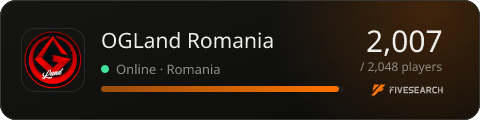](https://fivesearch.net/servers/8eeavd4)FiveM player count API
GET https://fivesearch.net/api/v1/servers/{cfx-code} returns one server’s live status. The code is the part after cfx.re/join/. Responses are cached for 30 seconds, so polling faster gains nothing; an unknown code answers 404 with {"error":"not_found"}.
// Live player count for any element with id="players"
async function updatePlayers() {
  const res = await fetch("https://fivesearch.net/api/v1/servers/8eeavd4");
  const { players, maxPlayers } = await res.json();
  document.getElementById("players").textContent = `${players} / ${maxPlayers}`;
}

updatePlayers();
setInterval(updatePlayers, 60000);{
"id": "8eeavd4",
"name": "OGLand Romania",
"online": true,
"players": 1923,
"maxPlayers": 2048,
"country": "RO",
"url": "https://fivesearch.net/servers/8eeavd4",
"joinUrl": "https://cfx.re/join/8eeavd4",
"updatedAt": "2026-09-30T17:59:50.543Z"
}Fair use: cache on your side, keep it to one request per server every 30 seconds, and link back to the server page where you show the numbers.